RCWeb App Development Guide
This guide explains how to create distributed, real-time applications using RCWeb technology. By leveraging a custom lightweight Java web server, RCWeb proxies raw JavaScript between connected web browsers, transforming them into a real-time distributed system without complex backend logic.
1. Core Concepts & Architecture
At the center of RCWeb is the assets/core/comms.js library. This library establishes a robust,
bidirectional connection to the RCWeb server.
- Rooms: Clients are grouped into rooms (e.g.,
abcd-efgh). Browsers in the same room can communicate. - Apps: An app provides an intial state for communication to start from. It will build the web page and set up variables to communicate in a room.
- Execution Model: Instead of sending JSON payloads that require rigid serialization and
parsing, clients send raw stringified JavaScript commands (via
rc.send(js, target)). The server proxies this string, and receiving clients execute it directly viaeval()insiderc.runJavaScriptUpdate().
Targeting Clients
The rc.send(js, target) and rc.sendFunctionCall(target, funcName, ...args)
functions send JavaScript to clients in the same virtual room.
The target parameter defines which clients receive the execution payload.
It can be a comma-separated list of apps, clients, or * for all.
- By App:
"chat"— Only clients withrc.app == "chat"will receive the JavaScript. - By Client ID:
"12345678"— Only the specific client withrc.client == "12345678"will receive it. - All Clients:
"*"— All types and all clients on the page will receive the JavaScript.
Sending Commands
There are two ways to send JavaScript commands to other clients:
1. Raw JavaScript (rc.send(js, target))
The rc.send(js, target) function sends a raw string of JavaScript to be executed on the target
clients.
This gives you full control but requires you to manually serialize and escape any arguments.
// Example: Manually constructing a JS string
rc.send("myApp.doAction('" + rc.client + "', 'hello world');", "viewer");
2. Remote Function Call (rc.sendFunctionCall(target, funcName, ...args))
rc.sendFunctionCall for most use cases.
The rc.sendFunctionCall helper simplifies communication by automatically serializing your
arguments (strings, numbers, objects) into a valid JavaScript string. This prevents common errors like
forgetting to escape quotes or handling newlines incorrectly.
// Example: Using the helper for the same action
rc.sendFunctionCall("viewer", "myApp.doAction", rc.client, "hello world");
The target string may also include modifiers to deny specific targets by prefixing them with an exclamation
mark (!):
- Deny by App:
"!chat"— All clients except those withrc.app == "chat"will receive it. - Deny by Client ID:
"!12345678"— All clients except the client with ID"12345678"will receive it.
Allowed and denied targets can be combined. For example, "chat!12345678" targets
all clients with rc.app == "chat" except the client with ID
"12345678".
Application Template Setup
Every RCWeb application HTML file requires the injection of server variables and the inclusion of the core library:
<script>
    var rc = {
            "version": "${version}",
            "app": "${app}",           // e.g. "chat"
            "room": "${roomId}",       // e.g. "abcd-efgh"
            "client": "${clientId}",   // e.g. "12345678"
            "commsWebSocket": "${websocket}"        // Websocket to communicate with all clients in same room
    };
</script>
<script src="/assets/core/comms.js"></script>
After defining application logic, establish the connection using rc.connect().
2. Application Patterns
RCWeb Apps generally follow one of two architectural patterns: Asymmetric (Sender/Viewer) or Symmetric (Peer-to-Peer Collaborative).
A. Asymmetric (Sender/Viewer) Pattern
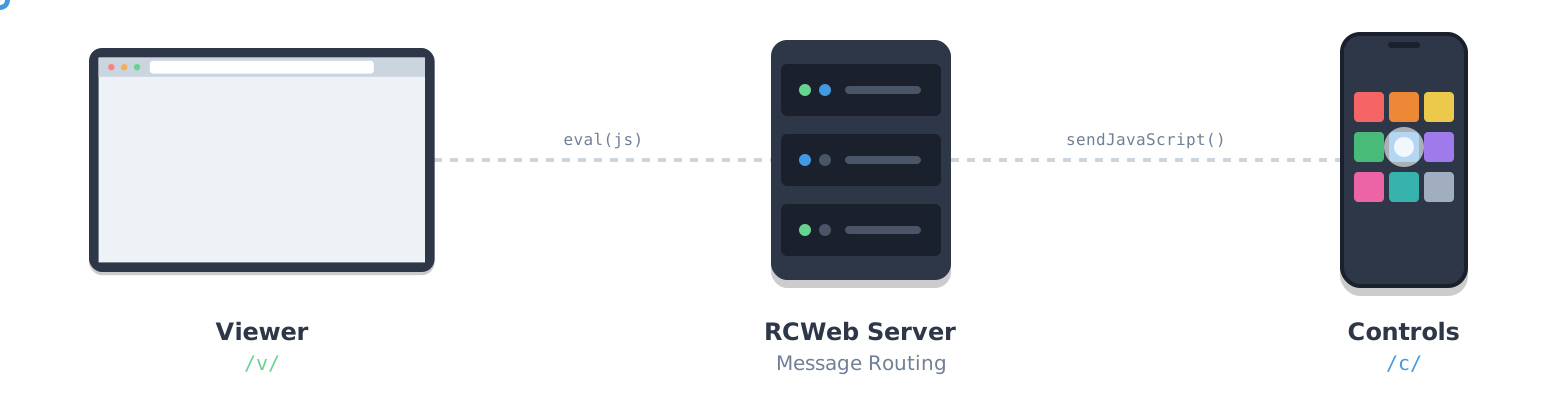
This pattern is perfect for remote controls, digital signage, or multi-player games where mobile devices act as controllers acting upon a primary shared screen.
Example: /v/script.js, /c/script.js
The Viewer (Target)
The viewer app exposes a global API that the controllers will call. It doesn't typically send commands itself; it just listens, applies state changes, and renders visuals.
// Example: Viewer API
var myApp = (function() {
    return {
        doAction: function(clientId, data) {
            console.log("Action received from " + clientId + " with data: " + data);
            // Update UI/State
        }
    };
})();

// Start app
rc.connect();
The Controller (Sender)
The controller attaches event listeners to UI inputs (like buttons or joysticks) and constructs JavaScript strings targeting the viewer.
// Example: Sending commands
document.getElementById('actionBtn').addEventListener('click', function() {
    // Send to clients in same room running the 'viewer' app
    rc.sendFunctionCall("viewer", "myApp.doAction", rc.client, "hello world");
});

rc.connect();
B. Symmetric (Peer-to-Peer Collaborative) Pattern
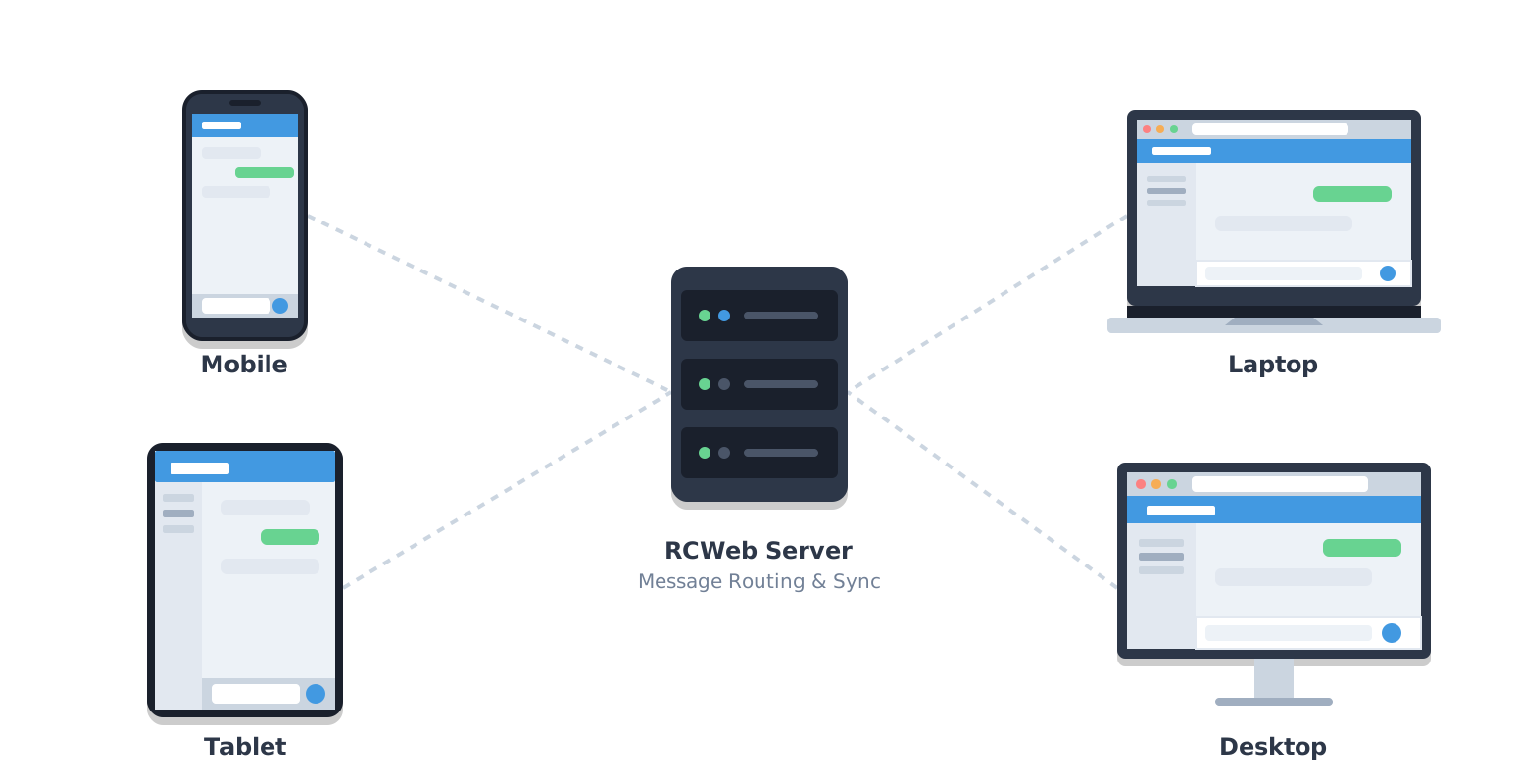
This pattern is used when all connected browsers are equal participants sharing synchronized state, such as collaborative document editing or shared file repositories.
Examples: chat/chat.js, notepad/notepad.js,
gallery/gallery.js, files/files.js
Broadcasting State
When local state changes (e.g., typing in a textarea), the client broadcasts an update command to all other clients in the same room running the same app.
// In notepad.js, when user types in the textarea
var sendNotes = function () {
    var notes = document.getElementById("notepad").value;
    // Broadcast to all 'notepad' clients using sendFunctionCall
    rc.sendFunctionCall("notepad", "notepad.updateNotes", rc.client, notes);
}
State Synchronization on Join
When a new client joins, it may miss the current state. RCWeb Apps handle this by triggering a refresh request when the network connects or when the peer count increases.
// 1. New client joins and asks for current state
rc.onUpdateNetworkStatus = function (heading, info) {
    if (rc.connected) {
        rc.sendFunctionCall("app", "app.refresh");
    }
}

// 2. Existing clients receive the request and ask everyone to broadcast
var refresh = function() {
    window.clearTimeout(refreshTimeout);
    refreshTimeout = window.setTimeout(function() {
        rc.sendFunctionCall("app", "app.broadcastState");
    }, 50); // Debounce to prevent flooding
}
3. Advanced Features
Handling Errors and Acknowledgements
RCWeb provides hooks into the eval() execution loop inside comms.js. You can
override these to provide feedback to senders.
rc.onUpdateSuccess(js): Triggered when local execution succeeds. Useful for measuring latency.rc.onUpdateError(error): Triggered on local execution failure.
The RC Viewer uses these hooks to send acknowledgements back to the RC Controller:
// In rc.js (Viewer)
rc.onUpdateError = function (error) {
    var escapedError = error.message.replaceAll("'", "\\'").replaceAll("\n", "\\n");
    // Forward error back to the controller UI
    rc.send("rc.onViewUpdateError('" + escapedError + "', '" + rc.client + "');", "c");
};
Streaming Shared Files & Proxies
The files and rc apps demonstrate how to transfer large files
without consuming massive server RAM or storing files centrally. This is achieved using proxy endpoints.
- Create Proxy URL: Generate a URL pattern specific to the host client.
"/x-file/" + rc.room + "/" + rc.client + "/" + fileId + "/" + safeFileName - Share URL: Send JavaScript to peers instructing them to render an
<a>or<video>tag pointing to this URL. - Handle Requests: When a remote peer requests the URL, the RCWeb server asks the hosting
client for the file chunks by invoking
rc.sendFileChunk(fileId, start, url)on the host. - Stream the File: The hosting client slices the requested chunk from the local
Fileobject and issues aPUTrequest back to the server, which pipes it to the requester.
// Using XMLHttpRequest to upload a chunk (from files.js)
var sendChunk = function (contentType, contentRange, chunk, url) {
    var xhr = new XMLHttpRequest();
    xhr.open("PUT", url);
    xhr.setRequestHeader("Content-Type", contentType);
    xhr.setRequestHeader("Content-Range", contentRange);
    xhr.send(chunk);
};
Conclusion
By relying on synchronized raw Javascript execution mediated by the RCWeb core framework, you bypass traditional rigid REST APIs and serialization overhead. This dynamic nature allows rapid prototyping and highly responsive, real-time distributed applications using minimal lines of code.